How to Describe a Character from an Image (Writers, RPG & AI Art Guide)

직접 시도해 보세요!
이 가이드를 실천해 보고 싶으신가요? 무료 캐릭터 설명기 도구를 사용하여 즉각적인 결과를 얻으세요.
How to Describe a Character from an Image (Writers, RPG & AI Art Guide)
You have a reference image — a piece of fan art, a character portrait, a stock photo, or a screenshot from a game — and you need to put it into words.
Maybe you're a novelist who found the perfect face for your protagonist. Maybe you're a Dungeon Master who needs a character sheet for an NPC. Maybe you're an AI artist who wants to recreate a character's look in Midjourney or Stable Diffusion.
In all these cases, you need a reliable way to describe a character from an image — capturing their appearance, clothing, and personality in precise, usable language. This guide covers both the craft of doing it manually and how to use a free character describer from image AI tool to do it instantly.
Why Describing a Character from an Image Is Hard
When you look at a character image, you absorb dozens of visual cues simultaneously — the way the light catches their hair, the subtle smirk in the corner of their mouth, the worn leather of their jacket. Translating all of that into language requires a systematic approach.
Most people describe only what stands out most and miss the details that truly make a character memorable. The result is a flat, generic description that fails the reader (or the AI generator).
A good character description from an image covers at least five layers:
- Physical build — height, body type, age, ethnicity
- Facial features — eyes, nose, lips, jaw, skin tone, scars or markings
- Hair — color, length, texture, style
- Clothing & accessories — style, material, condition, color palette
- Vibe & body language — posture, expression, the overall feeling they project
How to Manually Describe a Character from an Image
Before reaching for an AI tool, it helps to understand the framework that produces a strong description. Use these questions as a checklist when writing manually:
Step 1: Start with the Silhouette
Before any details, what is the overall shape? Is this character tall and broad-shouldered, or slight and hunched? Is their posture confident or defensive? The silhouette is your reader's first mental image.
Step 2: Work from the Face Downward
Our eyes go to faces first. Start there. What color are the eyes? What do they communicate? Is the skin smooth or weathered? Does the character have distinctive features — a broken nose, a prominent scar, unusually sharp cheekbones?
Move to the hair, then the neck and shoulders, then the torso, then the lower body.
Step 3: Describe Clothing with Purpose
Clothing is character. Every detail — a fraying hem, a polished badge, a hidden dagger at the hip — tells a story. Don't just list colors; describe what the clothing reveals about the character's status, profession, or personality.
Step 4: Capture the Intangible
What is the character's aura? Do they look dangerous, approachable, mysterious? This is where good writers separate themselves. Look at the expression, the posture, the eyes — what story are they already telling?
How to Use AI to Describe a Character from an Image
Doing this manually takes time and skill. A dedicated AI image person describer can analyze a character image in seconds and output a detailed, structured description optimized for your specific use case.
Our Character Describer from Image tool is purpose-built for exactly this. Unlike a general-purpose AI (like ChatGPT), it's tuned for character-focused output with four specialized modes:
| Mode | Best For |
|---|---|
| Creative Writing | Novelists and fiction writers who need vivid prose |
| RPG Character | Dungeon Masters and tabletop players who need a structured character sheet |
| AI Art Prompt | AI artists who need a Midjourney or Stable Diffusion–ready prompt |
| Custom | Anyone with a specific format or focus requirement |
Step-by-Step: Using the Character Describer from Image Tool
Here's how to get a detailed character description from any image in under a minute:
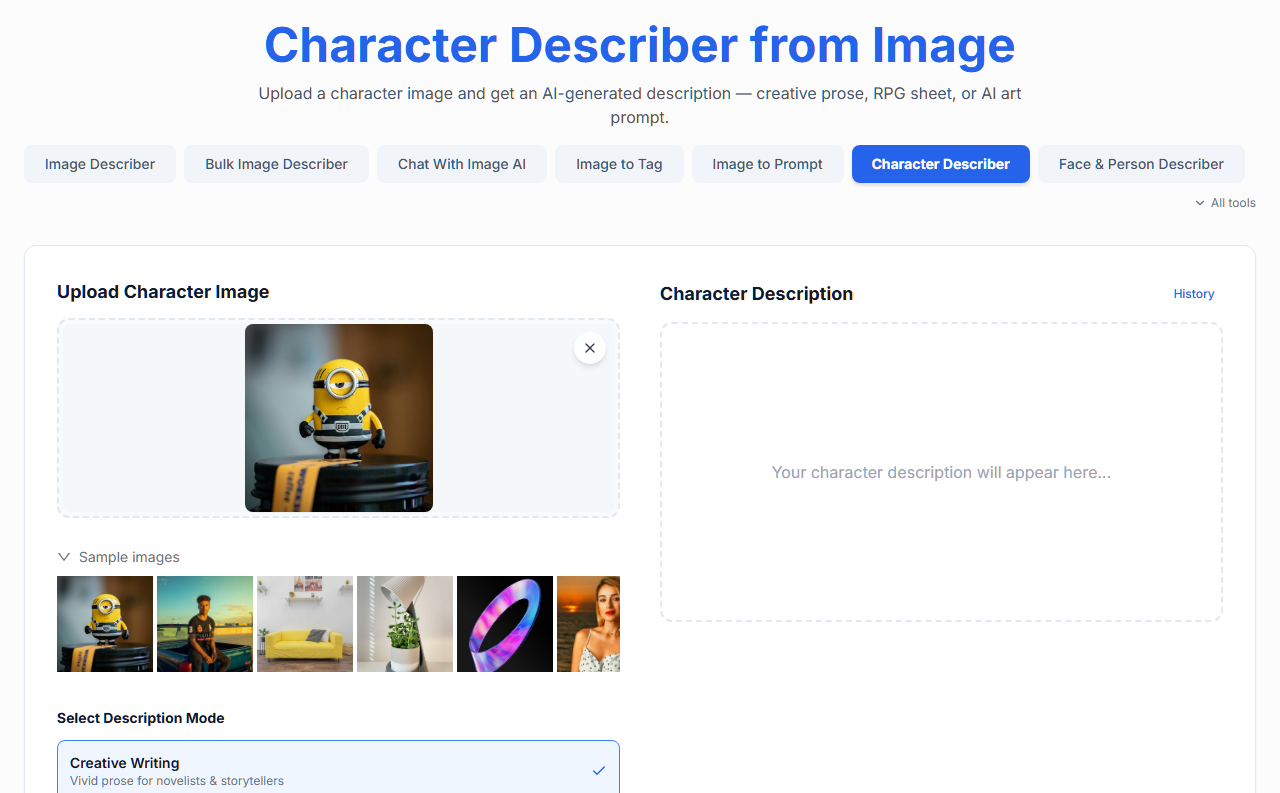
Step 1: Upload Your Character Image
Go to the Character Describer from Image page. Drag and drop your image into the upload area, paste it directly from your clipboard, or click to browse your files.
The tool accepts JPG, PNG, and WebP files up to 5 MB. Works with:
- Character artwork and illustrations
- Real photographs of people
- Game screenshots and character portraits
- Concept art and reference sheets
Step 2: Choose Your Output Mode
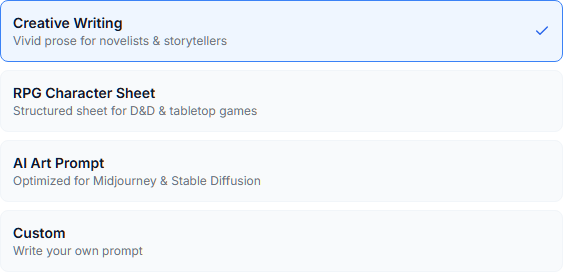
This is the most important step. Select the mode that matches how you plan to use the description:
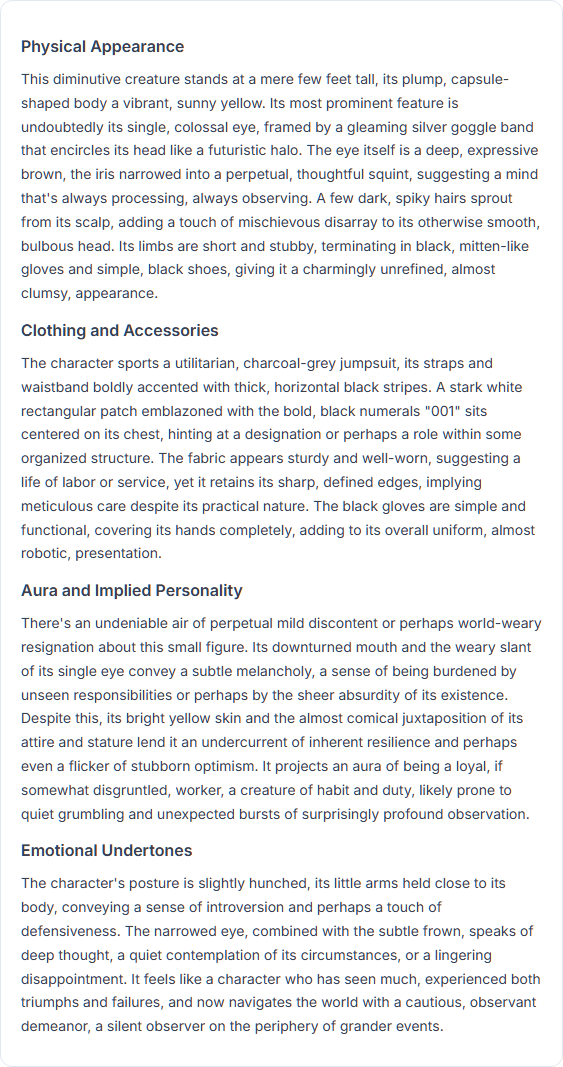
Creative Writing Mode generates flowing, literary prose — the kind of description you'd find in a published novel. It captures physical appearance, the character's aura, implied backstory, and emotional presence.
Example output snippet: "She carried herself with the quiet certainty of someone who had stopped apologizing for taking up space. Dark eyes — almost black — set beneath brows that curved like brushstrokes, suggesting curiosity held in permanent check by caution..."
RPG Character Mode produces a structured character sheet format, including race/species, build, attire, notable equipment, distinguishing features, and a one-sentence backstory hook. Perfect for D&D, Pathfinder, and other tabletop games.
Example output snippet:
Race: Human (apparent)
Build: Lean and wiry, ~5'10", early 30s
Attire: Worn leather duster, dark trousers, knee-high boots
Equipment: Holstered pistol (left hip), signet ring (right hand)
Distinguishing Features: A thin scar running from left temple to jawline
Backstory Hook: Someone who left their old life behind — and something followed.
AI Art Prompt Mode outputs a comma-separated, tag-heavy prompt optimized for Midjourney and Stable Diffusion, including a negative prompt section — ready to paste directly into your AI image generator.
Example output snippet: "portrait of a young woman, dark eyes, sharp cheekbones, black hair swept back, leather jacket, confident posture, dramatic lighting, cinematic, detailed, 8k — negative: blurry, low quality, deformed, cartoon, anime"
Custom Mode lets you write your own instruction. Want the description in bullet points? Focused only on the face? Written from a specific character's perspective? Type your instruction and the AI follows it.
Step 3: Select Output Language (Optional)
If you need the description in a language other than English, select your preferred language from the dropdown. The tool supports 14 languages — useful if you're writing in Spanish, Japanese, German, or any other supported locale.
Step 4: Click Generate
Hit the Describe Character button. In a few seconds, a detailed character description will appear in the output panel on the right.
Step 5: Copy and Use
Click the Copy button to copy the description to your clipboard. Paste it into your manuscript, your campaign notes, your AI art generator — wherever you need it.
You can also view your History to retrieve previous descriptions from the same session.
Real Use Cases: What Each Mode Is Good For
For Fiction Writers
If you're writing a novel and you've found a reference photo that looks exactly like your main character, Creative Writing Mode will give you publisher-ready prose you can adapt or quote directly. Use it to:
- Establish a character's first appearance in a scene
- Write a "character bible" entry for consistency across a long manuscript
- Break through writer's block when you know what someone looks like but can't find the words
For Dungeon Masters and RPG Players
RPG Character Mode turns any piece of character art into a ready-to-play NPC profile. Use it to:
- Quickly populate a city with distinct, memorable NPCs before a session
- Create a paper-trail description for a character your players have encountered
- Build out a PC's appearance for the group's shared notes
For AI Artists and Prompt Engineers
AI Art Prompt Mode is a reverse-engineering tool. If you've seen an AI-generated character you love — or a piece of concept art — this mode will extract the vocabulary to recreate that look in your own generator. Use it to:
- Recreate a character aesthetic in a different style
- Build a consistent "character card" for generating multiple images of the same character
- Extract the specific style tags (lighting, medium, camera angle) that define a look
Tip: For even more control over prompt generation from images, see our dedicated Image to Prompt Generator — it supports selecting specific target AI models like Midjourney, Flux, or DALL-E 3.
Tips for Better Character Descriptions
Whether you use our AI character image describer or write manually, these practices improve every output:
1. Use a clean, well-lit reference image. The AI (and your own eyes) performs better with images where the character is clearly visible. Avoid images with heavy motion blur, extreme stylization, or cluttered backgrounds that obscure the character.
2. Crop to the character. If your reference includes background elements or multiple people, crop tightly to the character you want described. This helps the AI focus on what matters.
3. Combine modes for a complete profile. Run the same image through Creative Writing Mode for your narrative description, then through RPG Character Mode for your stat-block notes. Two clicks, two outputs, one comprehensive character profile.
4. Use Custom Mode for genre-specific language. If you're writing science fiction and want the description to use "cyberpunk" vocabulary, or fantasy and want references to "elven features" and "enchanted armor," type that instruction into Custom Mode.
5. Iterate. A first description is a draft. Copy it, tweak it, run the image again with a modified prompt. The best character descriptions are always refined.
Summary
Describing a character from an image is a skill that sits at the intersection of careful observation and precise language — whether you're doing it for fiction, tabletop gaming, or AI art generation.
For those who want to work fast without sacrificing quality, a dedicated AI character describer from image like ours removes the friction entirely. Upload your reference image, choose the mode that fits your use case, and get a detailed, ready-to-use description in seconds.
Try it now: Character Describer from Image
직접 시도해 보세요!
이 가이드를 실천해 보고 싶으신가요? 무료 캐릭터 설명기 도구를 사용하여 즉각적인 결과를 얻으세요.